Hello! The reason I want to build a new pc is because my current pc is extremely old and I experience frequent frame drops and slow processing and a lot of other issues and because all of the parts are so old I am wanting to just build a whole new pc. I do have 32GB of ram and a 2TB SSD that I am planning on switching from the old pc to the new one I am planning on building. Im also wondering if I am able to do that or if thats not possible? My budget is 2k and I have absolutely no clue what parts are good, what is compatible with one another, or if these parts I have selected fit in the case. https://newegg.io/1eed2109 is the list I made I kinda just chose random parts that I know are good but I dont know if there is parts that is better or work better together. I am down for anything I just want the best pc I can build for 2k or under! Any help or tips at all are really appreciated thank you!
Hello,welcome to the community!
Before anyone can really recommend the best build, it would help to know a little more about your current system and how you’ll be using the new one. What are your current CPU, GPU, and monitor specs, and what games or programs do you use most often? Are you primarily gaming, or will you also be streaming, editing videos, doing content creation, or other productivity work?
You mentioned reusing your 32GB of RAM and 2TB SSD. The SSD can likely be moved to the new system without any issues, but knowing the exact model would help determine whether it’s still a good fit for a modern high-end build. The RAM may or may not be reusable depending on whether it’s DDR4 or DDR5, since current platforms require one or the other.
Looking at the parts list, the RX 9070 XT  is a strong choice, especially for gaming. However, if gaming is your primary goal, you may get better performance for your money by going with an AMD Ryzen 7 9800X3D instead of the Intel Core Ultra 9 285K. The Intel chip is powerful, but it costs more and generally doesn’t offer the same gaming performance advantage as the 9800X3D. I’d also consider a stronger cooler and an 850W 80+ Gold power supply for a build in this price range.
With a $2,000 budget, you can put together an excellent gaming PC, but the best recommendations will depend on what you play, your monitor resolution, and whether you’re doing anything beyond gaming. Give us your current specs, the games you play most, and your monitor resolution/refresh rate, and we can help fine-tune the build and make sure you’re getting the most performance for your money.
Honestly I’m pretty proud of this one https://newegg.io/f2db554
A 870 Board 32GB of Ram 5070 Ti 850PSU for $1975 Cart price Plus $20 in mail in rebates
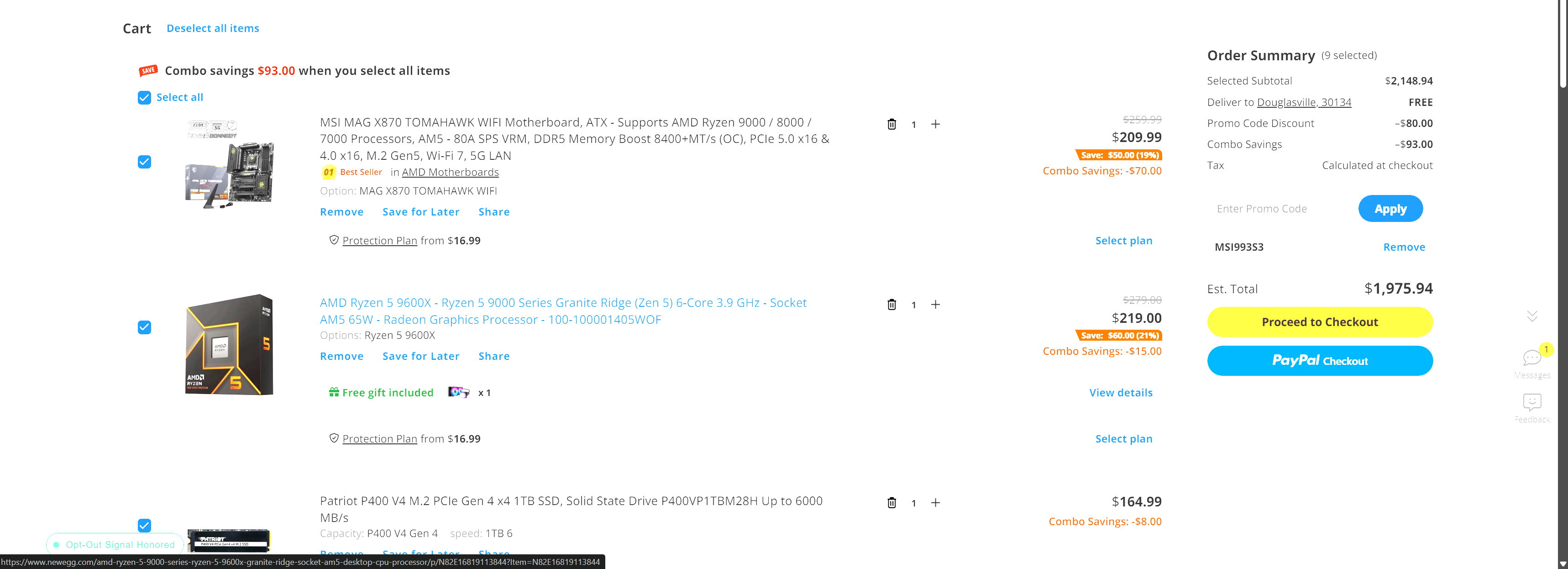
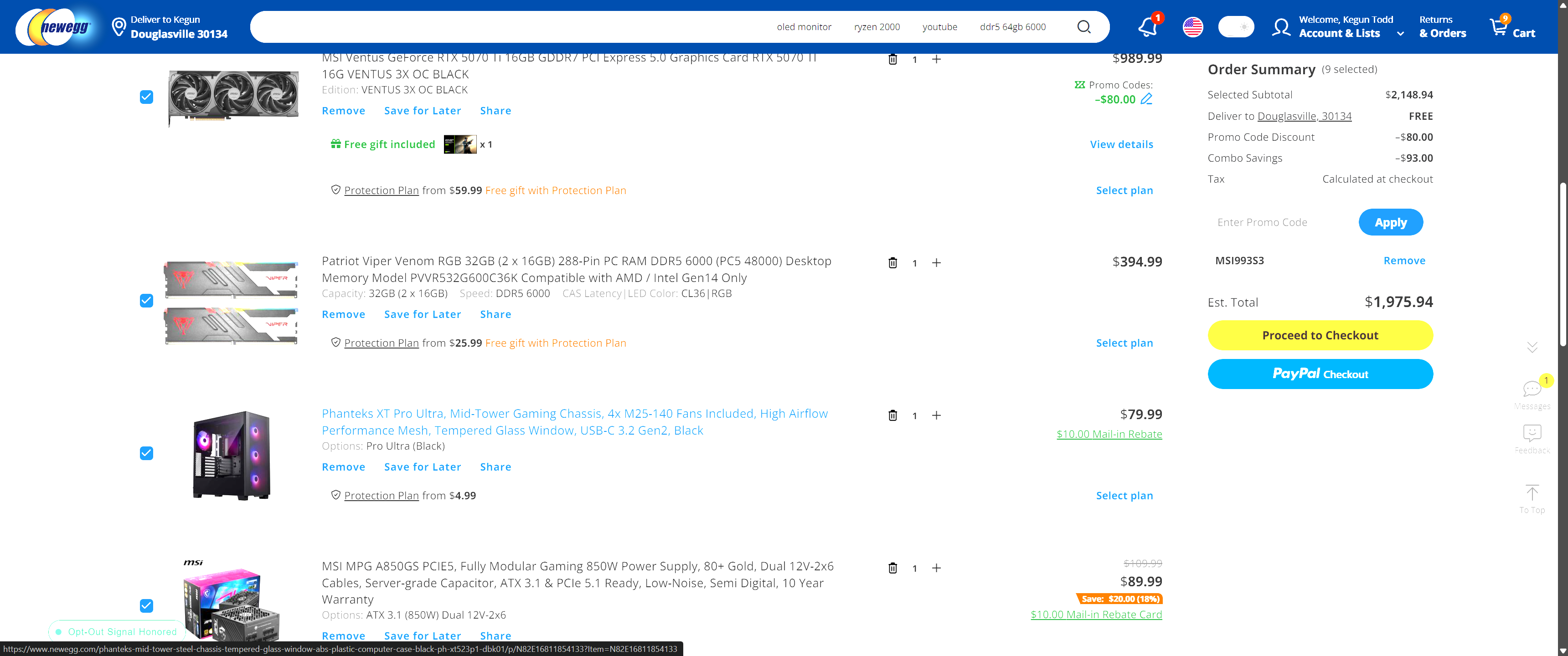
If you would rather have Intel CPU & board you may edit this list or switch the 5070 Ti to 9070XT but that’s great price on a 5070Ti
And Here’s the same system with a 9800X3D and 9070XT for $2011 cart price
https://newegg.io/ebd4f5f9
7700X & 5070 TI for $2011
https://newegg.io/288f0a67
Hello! I appreciate the response a lot! I did forget to mention that I would be using this new pc for gaming mainly and some games I wish to have good performance in would be minecraft (for fighting), valorant, and fortnite for example. I am glad the SSD can be moved over and I have DDR4 RAM idk if that means I can move it over or not lmk. That sounds great that I can use that gpu and I honestly just picked intel cause its most familiar to me but whatever would give me the best performance. My current specs are CPU: Intel I5-6400 GPU: NVIDIA GeForce GTX 1070. And the Monitors I have are the MSI G271 my refresh rate is 60 HZ and my resolution is 1920x1080. also do you think I should do air cooling or liquid cooling? and feel free to make me a whole new list lol I just dont really know whats compatible with one another and how to make the best pc possible. I really appreciate the help and if you would be able to make me a list of what I should get based off of what I gave to you I would really appreciate it! Thank you for the help!
I appreciate the suggestion thank you so much! I sent my current specs and what I will be using the pc for in a prior response to somebody else, would that change what you would suggest?
First off, thanks for posting your current specs and what games you actually play. That makes it a lot easier to recommend something that fits your needs.
Looking at your current system (i5-6400, GTX 1070, DDR4 platform), I personally wouldn’t bother reusing much of it. There’s nothing wrong with it, but it’s getting pretty dated at this point. Honestly, I’d probably sell the whole thing locally and put whatever money you get toward the new build. Even if it’s only $100-$200, that’s still money going toward the upgrade.
I’d also recommend going AMD for this build. The main reason is upgradeability. AMD has done a really good job supporting the AM5 platform, so if a few years from now you decide you want a faster CPU, you have a much better upgrade path than Intel has offered over the last few generations.
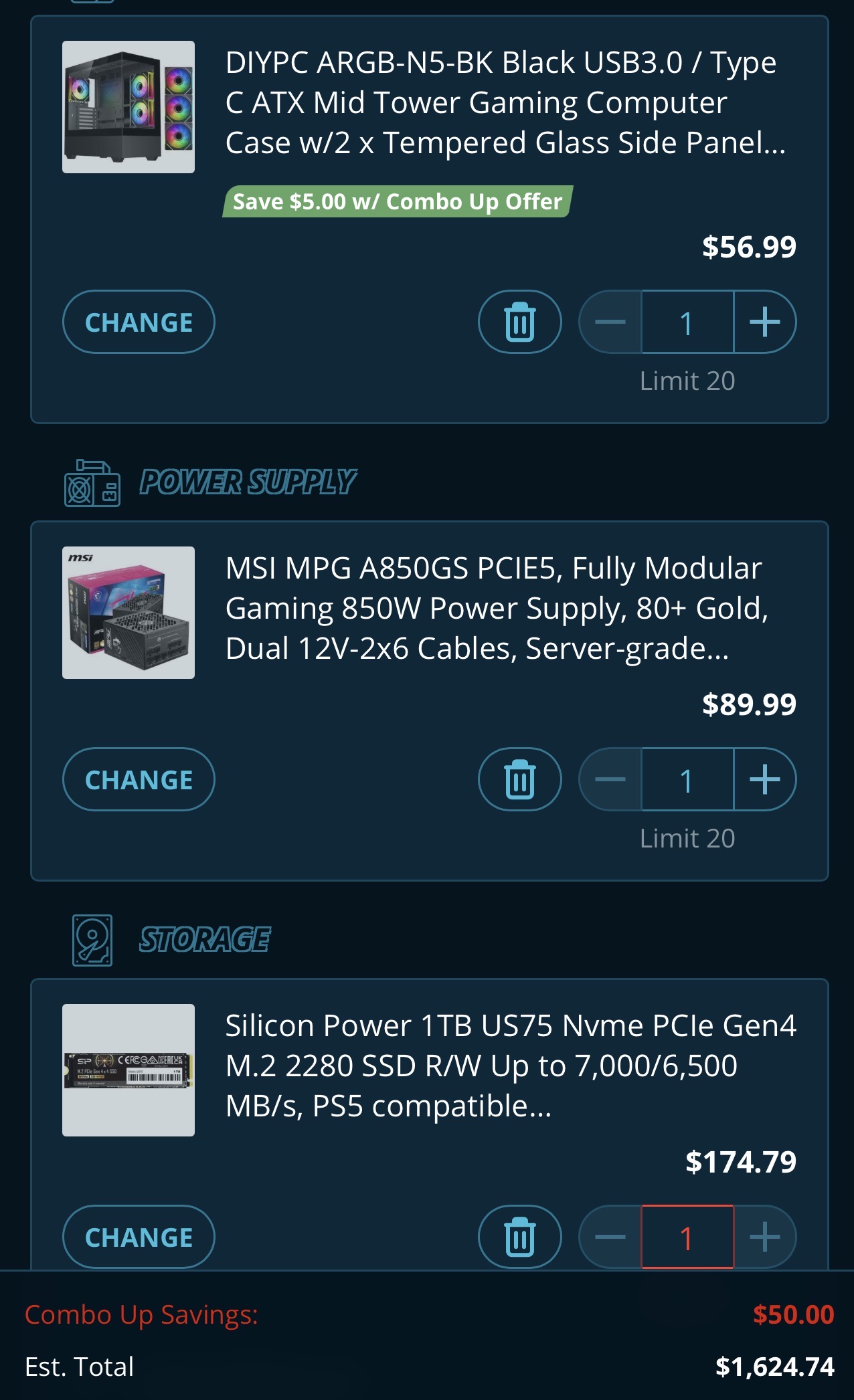
This is the build I came up with and it comes in around $1,600:
- Ryzen 7 9700X
- ASUS TUF B850M-E WiFi
- 32GB DDR5 EXPO RAM
- Radeon RX 9060 XT 16GB
- 1TB Gen4 NVMe SSD
- MSI MPG A850GS 850W Gold Modular PSU
- Air Cooler
- ATX Case
I know a lot of people are going to tell you to buy an X3D chip for gaming, and honestly I love X3D CPUs myself. They’re awesome gaming processors. But looking at the games you listed—Minecraft, Valorant, Fortnite, etc.—I don’t think you really need one. The 9700X is already a great gaming CPU and should have no problem with anything you’ve mentioned.
The motherboard and power supply are probably a little overkill for what you’re doing right now, but that was intentional. I’d rather see you spend a little more on the foundation of the system and have room to upgrade later than save a few bucks now and have to replace parts down the road.
For the GPU, I think the RX 9060 XT 16GB is more than enough for what you’re playing and will be a huge jump from the GTX 1070.
The case is mostly just a placeholder. Cases are personal preference. I’d find something you really like the look of with good airflow and call it a day. Personally, I wouldn’t spend much more than about $100 on a case.
I put a 1TB SSD in the build because it’s enough to get started, but if you like keeping a lot of games installed you may want to bump it up to 2TB. The nice thing is that motherboard has multiple M.2 slots, so adding another SSD later is easy.
The build includes a free air cooler. I personally like AIO coolers, but for a 9700X a decent air cooler is more than enough and will save you some money.
If you end up picking different RAM, I’d make sure it’s EXPO-compatible for AMD. I also picked the ASUS TUF board because I’ve always had good luck with ASUS boards and I think their BIOS is pretty easy for first-time builders to work with.
One last thing: before you buy a new copy of Windows, check to see if your current Windows license is tied to your Microsoft account. There’s a decent chance you can transfer it and save yourself some money.
I am sure Kegun will come back with some other options and you should listen to him. He especially has a great sense of finding these crazy deals and probably would save you even more money.
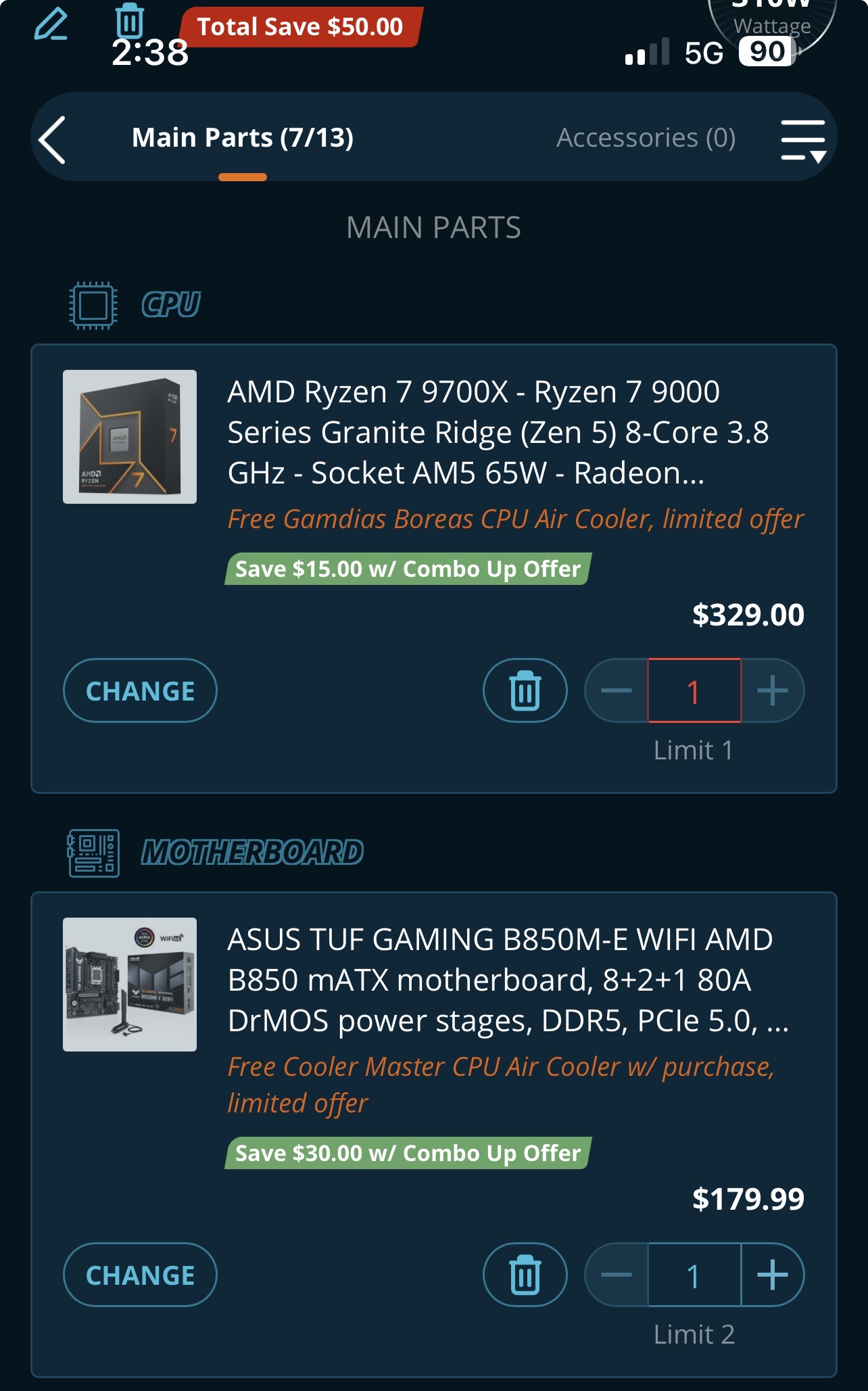
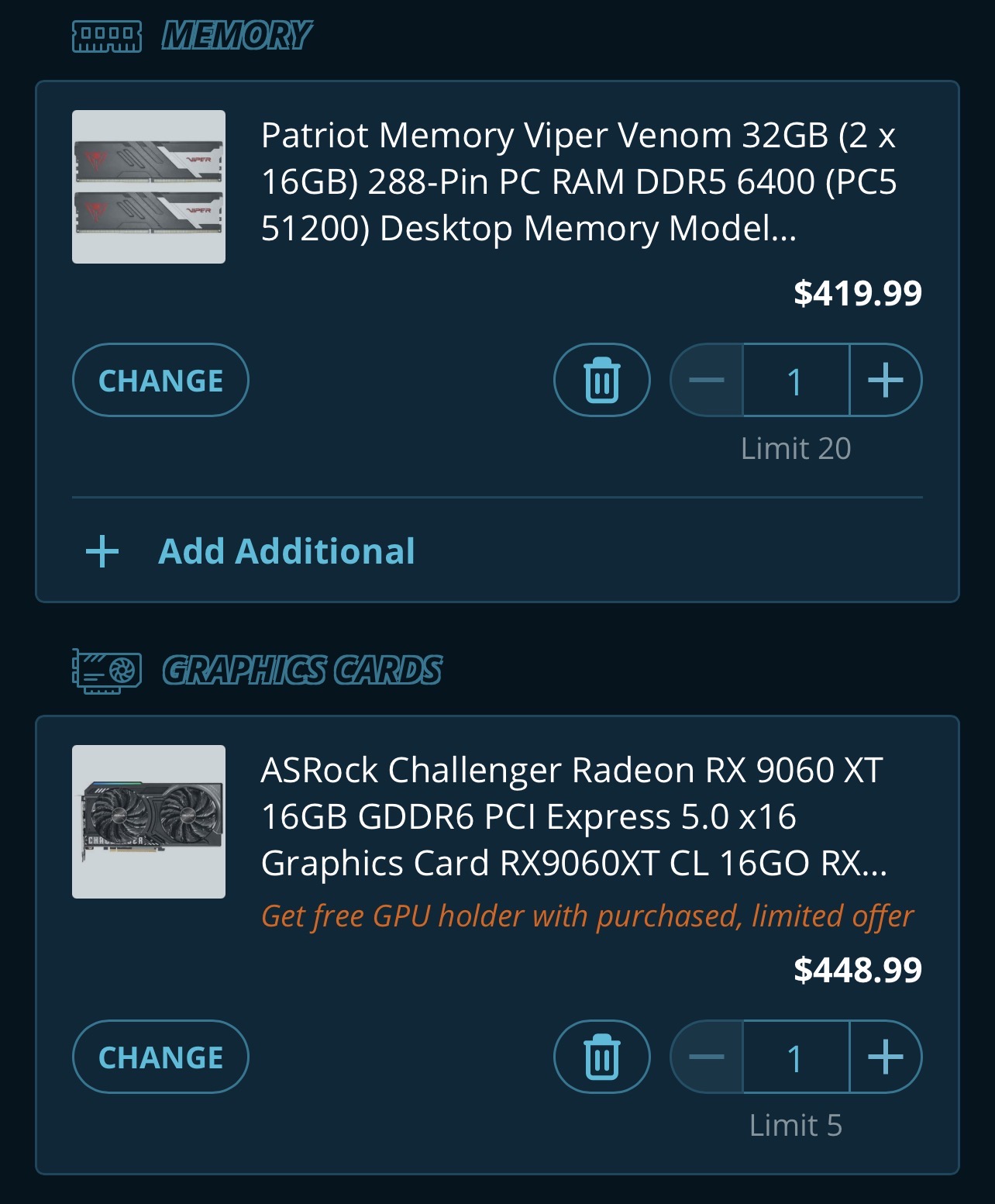
Thank you so much Viraco! I REALLY appreciate it and this is the best advice I think ive ever been given! Its so fascinating to me how much you know about pcs and I strive to have that much knowledge someday. I like everything you have suggested to me a lot and I agree the old parts are too old to transfer over. I do think I will do a 2TB just because of how big games are nowadays lol, which 2TB would you recommend? I did forget to mention my OS right now is windows 10 home so do you think I should go up to the 11 instead of transfering it? Also you said the motherboard allows you to add multiple SSDs? I didnt know that was possible lol does that mean I could transfer over my old SSD and add a new one on top of that? I really appreciate the help seriously! Thank you!
Glad to hear it helped!
As for the SSD, if you’re going to move up to a 2TB drive, I’d just make sure it’s a PCIe 4.0 NVMe SSD with around a 7,000 MB/s read speed or better. Personally, I’d focus more on the specs than the brand name. There are a lot of good SSDs out there, and I don’t think you need to pay a premium just because a particular brand is popular with gamers. I’d shop around and buy whichever reputable drive gives you the best value at the time.
As for your old SSD, you technically could move it over, but honestly I’d probably leave it in your current computer. The biggest reason is that it’s much easier to sell a complete, working PC than one that’s missing parts. Even if you only get a couple hundred dollars for the old system, that’s still money going toward the new build.
While moving the SSD is possible, Windows can sometimes get confused when it suddenly finds itself on a completely different motherboard, chipset, and CPU. It’s usually fixable, but it can create some headaches, especially for a first-time builder. I’d rather keep things simple.
My recommendation would be:
Build the new PC
Install Windows 11 fresh on the new SSD
Get everything working properly
Sell the old PC complete
As for Windows, I would definitely move to Windows 11. Windows 10 is reaching end-of-support, so if you’re building a brand-new PC today I’d start fresh with Windows 11 and not look back.
Before buying a new Windows key, check whether your current Windows license is tied to your Microsoft account. If it is, you may be able to transfer it. Last I checked, Windows 10 licenses could generally activate Windows 11, but Microsoft changes licensing policies from time to time, so I’d verify that before spending any money.
Hope that helps!
here’s some informational videos for you to help you with your first build there are a couple years old but still very relevant
https://www.newegg.com/gamer/community/t/for-all-the-first-time-builders/1805?u=viraco
Thank you so much for the help! I totally agree with you now that I think about it! Being able to get whatever I can for my old pc is a good idea. Thank you so much I will let you know how the build goes!
Also you said you like AIO coolers but the motherboard comes with an air cooler which is still good, but I see as im checking out the case comes with an AIO cooler too. should I use the AIO one or the air cooling fan?
I just had the same discussion with someone else very recently this was my response.
Liquid cooling’s biggest advantage isn’t that water is magically colder than air—it’s that it moves the heat away from the CPU and out of the case faster.
An air cooler dumps most of its heat right around the CPU socket, and the case fans then have to remove that hot air.
Under long gaming sessions or sustained heavy loads, a good AIO often maintains slightly lower temperatures because it’s more efficient at getting the heat out of the case instead of letting it accumulate inside it.
that being said I believe both those components come with an air cooler not a water cooler. It is just a giveaway that Newegg is doing you could just keep the one you like the best maybe put the other one up on eBay or something
as far as I can see the case does not come with a AIO. All that I can see is that it can accept up to a 360 mm AIO if installed on the top.
Good luck with your build. Have fun and show it off when you’re done!
Let’s get a system for around $1700 that way you upgrade your monitor 60hz isn’t going to cut with any new hardware how room do you have? I have this beast and it’s been great for 3 years now It’s currently on sale Are you still using your DDR5 ram and 2TBSSD?
Amazon.com: msi MAG 401QR, 40" Gaming Monitor, 3440 x 1440 (UWQHD), IPS, 155Hz, 1ms, AMD FreeSync Premium, HDR400, HDMI, Displayport, USB C, Tilt, Black : Electronics
Hey Kegun,
I realized I messed up my monitor does 144Hz i just had it set on 60 in my settings for some reason.
Ok good. What the DDR5 Ram and SSD? you still using those?