On October 28, Microsoft released a preview of what it calls the most significant update to DirectX Raytracing since DXR first appeared in 2018. The headline that spread from there was "up to 90% less VRAM for ray tracing," and the story spread quickly through PC hardware news because one demo showed an RX 9070 jumping from 1.2fps to 79fps.
Both numbers are real. Both also need context before anyone makes a buying decision based on them. Here's how I read it.
What actually changed?
Ray tracing needs acceleration structures, which are basically indexes of the scene's geometry that let the GPU find what a ray hits. Building and updating them is expensive, especially in big worlds with lots of animation.
The preview adds two ideas. Clustered Geometry breaks meshes into small reusable clusters of up to 256 triangles, so engines can reassemble them instead of rebuilding everything from scratch. Partitioned TLAS splits the top-level scene structure into regions, so only the parts that changed are updated each frame. Builds can also be driven by the GPU itself. It ships in Agility SDK 1.722-preview.
Where does the 90% figure come from?
Microsoft's own sample, running on a Radeon RX 9070. In clustered mode, total acceleration structure memory dropped from 7,519 MiB to 774 MiB, about 89.7% less, the per-frame build cost fell from 788 ms to 3.11 ms, and per-frame ray tracing time dropped from 72.6 ms to 9.27 ms. Together, that's how the frame rate went from 1.2fps to 79fps.
The catch is in Microsoft's own write-up. Microsoft describes it as one configuration in a test playground and warns not to expect games to see wins of this size, and the clustered approach actually needs more temporary scratch memory during builds. Real games won't all see numbers like these.
Which GPUs support it?
At preview, Microsoft lists every NVIDIA RTX GPU, AMD's Radeon RX 9000 series, and Intel Arc B-Series plus Core Ultra 200V and Series 3 processors, with Qualcomm planned for 2027. Microsoft notes that the features don't require new hardware beyond existing ray tracing support, but older generations may or may not be exposed depending on driver work.
Will my current games get faster?
No, not by themselves. Because these are new APIs that games must integrate, existing games won't speed up from a driver update alone. NVIDIA already offers a similar approach through its own RTX Mega Geometry, and Gears of War: E-Day is an early adopter of clustered geometry through that vendor-specific path. The point of the DirectX version is a common path across vendors.
When could games actually use it?
Microsoft hasn't given a date for the final release. Developers need the preview Agility SDK, a supporting driver and Windows Developer Mode just to try it, which tells you how early this is. A new DXR feature usually takes a while to show up in shipping games, and open-world engines with lots of animated geometry are the most likely early adopters.
So does 8GB of VRAM suddenly look fine?
This is where I'd be careful. Acceleration structures are one part of a game's memory use. Textures, frame buffers and everything else still need room. And it'll be a while before many shipping games use the standardized APIs. I wouldn't buy an 8GB card on the assumption that this update will save it.
What I'd buy with this in mind
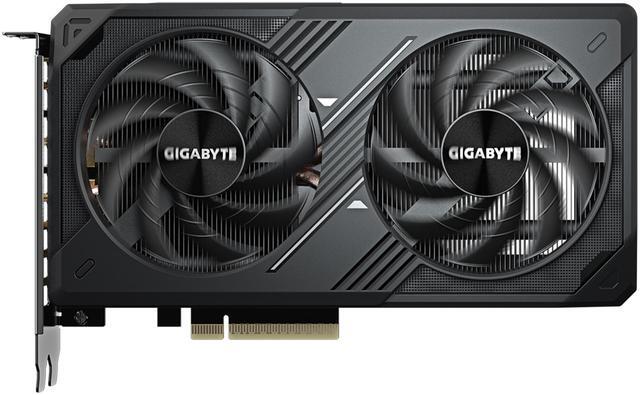
If budget really limits you to 8GB, the GIGABYTE WINDFORCE RTX 5060 is supported on the NVIDIA side and is a reasonable 1080p card. Just treat future savings from this update as a bonus.
For a mainstream card, I'd step up to 16GB. The ASUS Dual RTX 5060 Ti 16GB and the SAPPHIRE PULSE RX 9060 XT 16GB both pair 16GB with a 128-bit bus, which is a sensible mix for 1080p and lighter 1440p with ray tracing.

For 1440p ray tracing, the ZOTAC RTX 5070 SOLID OC 12GB, the GIGABYTE RX 9070 Gaming OC 16GB and the PowerColor Reaper RX 9070 XT 16GB are the tier I'd look at. The two Radeon cards have 16GB on a 256-bit bus, and the RX 9070 is the exact GPU Microsoft used for its sample.
At the high end, the GIGABYTE WINDFORCE RTX 5080 has 16GB of GDDR7 on a 256-bit bus at 30Gbps.
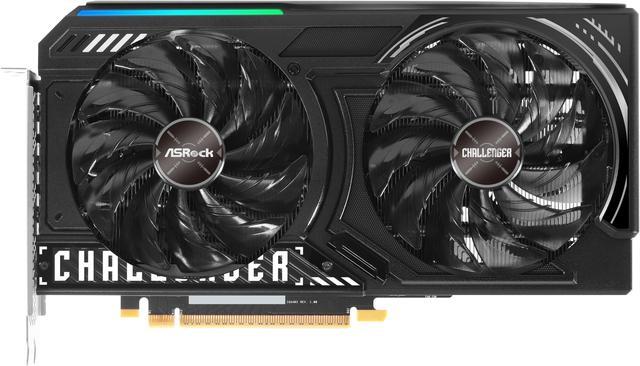
If you're on a tighter budget and like Intel, the ASRock Challenger Arc B580 is a 12GB card from the Arc B-Series, which Intel has listed as supported for the preview.
My take
This is good news for ray tracing in big open worlds, and having it standardized across NVIDIA, AMD and Intel matters. But it's a developer preview, not a free upgrade. Buy for the games you play now, aim for 12 to 16GB on a new card, and let these improvements show up as a bonus when games adopt them.
Frequently Asked Questions
What did Microsoft announce for DirectX Raytracing? On October 28, 2026, Microsoft released a preview of DXR Clustered Geometry and Partitioned Top-Level Acceleration Structures, plus GPU-driven acceleration structure builds, in Agility SDK 1.722-preview. Microsoft called it the most significant DXR update since 2018.
Which GPUs support it? At preview, Microsoft lists all NVIDIA RTX GPUs, AMD Radeon RX 9000 series GPUs, and Intel Arc B-Series graphics plus Core Ultra 200V and Series 3 processors. Qualcomm support is planned for 2027.
Will my existing games use less VRAM now? No. Because these are new APIs that games have to integrate, existing games will not speed up from a driver update alone.
Is the 90% VRAM reduction real? In Microsoft's sample on a Radeon RX 9070, total acceleration structure memory fell from 7,519 MiB to 774 MiB. Microsoft also warns that this is one configuration in a test playground and games should not be expected to see wins of that size.
Should I buy an 8GB graphics card because of this update? I would not. Adoption will take time, and ray tracing acceleration structures are only part of a game's VRAM use. For a new card, 12GB to 16GB is still the safer choice.
Read More
- Raytracing: Clustered Geometry, Partitioned TLAS, Indirect Acceleration Structure Builds (Microsoft DirectX Blog): Microsoft's technical announcement, including the RX 9070 sample results and supported hardware.
- DirectX Agility SDK 1.620 and 1.722-preview (Microsoft): The parent release post for the Agility SDK that carries the preview.
- DirectX Raytracing Functional Spec, Part 2 (Microsoft): The specification for developers who want the details.
- Ray tracing memory usage could be reduced by up to 90% (PC Gamer): A readable news summary of the update and its caveats.
- Best Graphics Cards for Open-World Games in 2026 (Newegg Insider): Our GPU picks for big, ray-traced open worlds.