

The laptop market in 2026 looks dramatically different from what it did just three years ago. AI-accelerated workloads, thinner hinge mechanisms, and the rise of Copilot+ PCs have pushed both the 2-in-1 and traditional clamshell categories to new performance heights — but they remain fundamentally different machines designed for different people. So how do you choose?
What Is a 2-in-1 Laptop?
A 2-in-1 laptop is a device that can function as both a laptop and a tablet. Most use either a 360-degree hinge (convertible) or a detachable keyboard (detachable). The screen doubles as a touch display, and many models support active stylus input for drawing, note-taking, and document annotation.
Leading 2-in-1 designs in 2026 — such as those found in the 2-in-1 Laptop category at Newegg — have shed weight dramatically. Many convertibles now weigh under 1.3 kg and feature OLED touch screens with 120 Hz refresh rates, making them genuinely competitive with standalone tablets.
 Common 2-in-1 form factors:
| Type | Mechanism | Best For |
|---|---|---|
| Convertible | 360° hinge, keyboard stays attached | Students, frequent travelers |
| Detachable | Keyboard snaps off completely | Artists, tablet-first users |
| Slider | Keyboard slides under display | Niche productivity uses |
What Is a Traditional Clamshell Laptop?
A clamshell laptop is the classic design: a hinged lid that opens to reveal the display, typically stopping at 135°. There is no touch screen (in most models), no stylus support, and no tablet mode. Instead, every engineering decision is optimized for the keyboard-and-trackpad workflow.
This singular focus is exactly where clamshells shine. Without the rotating hinge mechanism, designers can dedicate more internal space to larger cooling systems, bigger batteries, and more powerful discrete GPUs. The result is that the highest-performing laptops — gaming laptops and high-end workstations — almost exclusively follow the clamshell form factor.
Key Technical Differences in 2026
1. Processing Power and Thermal Design
Clamshells have a structural advantage when it comes to thermals. The fixed hinge allows engineers to run thicker heat pipes and larger vapor chambers without worrying about flex when the screen rotates. This is why the most powerful laptops — those carrying NVIDIA GeForce RTX 50 Series GPUs like those in Newegg’s RTX 50 laptop lineup — favor the clamshell chassis.
2-in-1 laptops, by contrast, typically carry energy-efficient processors (ARM-based Snapdragon X Elite, Intel Core Ultra 200V, or AMD Ryzen AI 300 series) that generate less heat. This is intentional: a thinner chassis that needs to lie flat as a tablet cannot exhaust the same thermal load. The tradeoff is real, but for many users — especially those using AI-assisted productivity tools — the performance is more than sufficient.
 2. Display Technology
2-in-1 displays are universally touch-enabled and frequently come with pen digitizer support (Wacom AES or Microsoft Pen Protocol). Clamshell displays, particularly in gaming and business configurations, often prioritize refresh rate (144 Hz, 240 Hz) and panel accuracy (Mini-LED, OLED) over touch interaction.
In 2026, the best Copilot+ PCs — which require a Neural Processing Unit (NPU) rated at 40+ TOPS — appear in both categories, bringing on-device AI features like live captions, AI-generated backgrounds, and Windows Recall to a wide range of form factors.
3. Battery Life
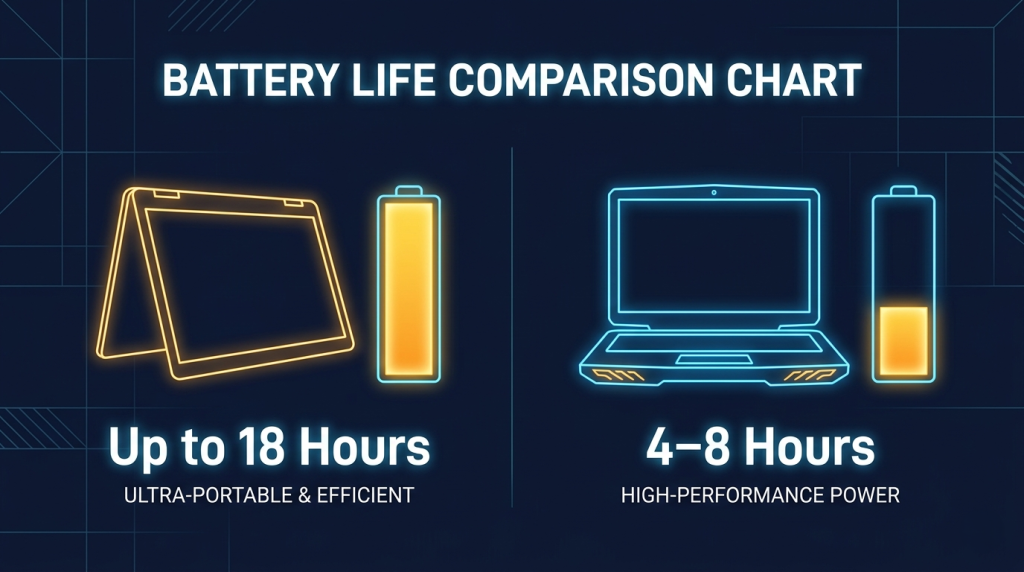
Because 2-in-1 laptops are designed for portability and flexibility, they tend to carry battery cells sized to maximize all-day use within a thin chassis. ARM-based 2-in-1 designs regularly exceed 15 hours of real-world use. Clamshells with discrete GPUs typically deliver 6–10 hours, with gaming configurations sometimes dropping below 4 hours under load.
| Metric | 2-in-1 Convertible | Traditional Clamshell (Gaming) | Traditional Clamshell (Business) |
|---|---|---|---|
| Avg. Battery Life | 12–18 hours | 4–8 hours | 8–14 hours |
| Discrete GPU Available | Rarely | Almost always | Sometimes |
| Touchscreen | Standard | Rare | Optional |
| Active Stylus Support | Common | Rare | Rare |
| Weight | 1.1–1.6 kg | 1.8–3.5 kg | 1.2–2.0 kg |
4. Storage and Expandability
Both categories now standardize on NVMe SSDs, with fast M.2 SSDs being the norm rather than the exception. However, 2-in-1 chassis are often sealed units — RAM is frequently soldered, and storage may be non-replaceable. Clamshell business and gaming laptops are more likely to offer user-accessible RAM slots for future upgrades.
The AI Angle: How AI Changes the Equation in 2026
The arrival of Copilot+ certification and on-device AI inference has changed the practical calculus significantly. Tasks that once required heavy cloud offloading — real-time translation, AI image generation, intelligent search — now run natively on the NPU. This gives thin 2-in-1 laptops capabilities that would have required a dedicated workstation three years ago.
For the growing segment of users who work primarily with AI tools, the 2-in-1’s lightweight profile and all-day battery start to look extremely attractive — even if raw GPU benchmarks favor the clamshell.
Which One Should You Buy?
Use the Newegg Laptop Finder to filter by use case, but here’s a quick decision guide:
Choose a 2-in-1 if you:
- Frequently switch between note-taking and typing
- Want a device that doubles as a drawing tablet
- Need all-day battery life without carrying a charger
- Travel frequently and value versatility over raw power
 Choose a traditional clamshell if you:
- Need maximum GPU performance for gaming or 3D work
- Want the best value-for-performance ratio
- Prefer a dedicated, familiar laptop experience
- Plan to upgrade RAM or storage yourself
Both form factors have matured considerably in 2026. The gap between them is narrowing — but they remain distinct tools, and understanding what matters most to your workflow is the best way to choose.
Related Posts
- Understanding Copilot+ PC: The AI Revolution in Laptop Computing for 2026
- Chromebook vs Windows Laptop 2026: Understanding the Fundamental Differences
- What Screen Size Laptop Should I Buy? The Complete 2026 Guide
- The AI Revolution in Your Laptop: Understanding Copilot+ PCs in 2026
- AI-Enhanced Productivity Laptops: How Intelligent Hardware Is Transforming Modern Computing